

Editing ongoing automations

Written by Aneta Koreba
Learn how automation works
How it works
Our "Drag and Drop Editor" for automations is actually a visual programming editor. Automation is, essentially, a set of rules. Each user that falls into a specific scenario writes a rule(s), not the whole automation: a single module, one after the other, as the conditions are fulfilled.
Case study
What about the module, Delay?
Let’s say we have an automation: Tag Added > Delay (30 minutes) > Send an email campaign.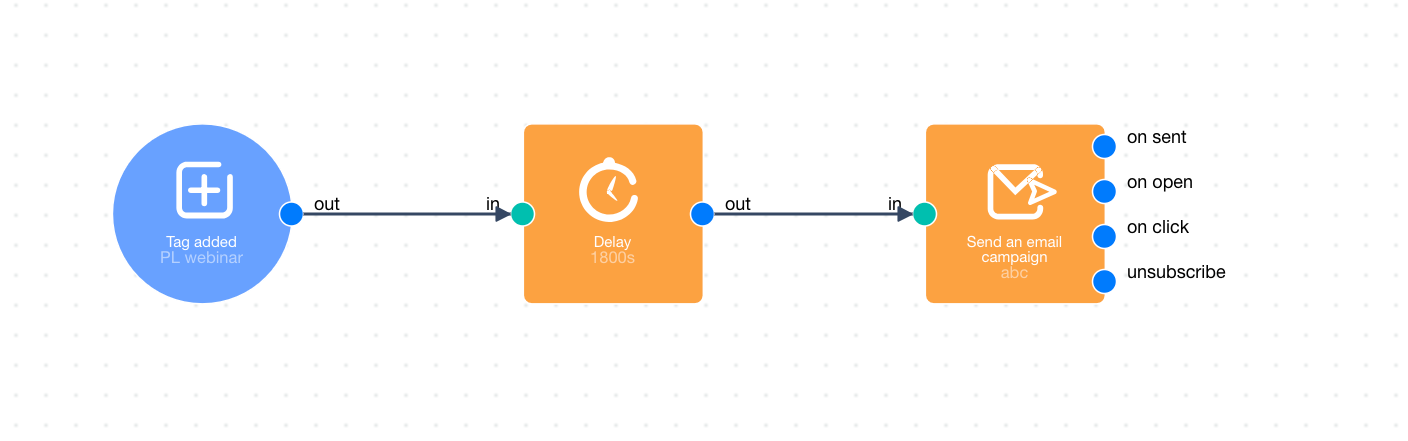
- At 2:10 pm a tag was added.
- At 2:15 pm you switched off the automation.
In the above automation, previously in the Send an email campaign, “Campaign A” was sent. You change it to “Campaign B”.
- At 2:20 pm you turned on the automation.
Which campaign will be sent now?
The answer: “Campaign B”.
Basically, if you switch the campaigns in the module, Delay, the second campaign (after the change), “Campaign B”, will be sent.